- Home Page /
- Electronics /
- Computer Accessories /
- Computer Accessories & Peripherals /
- Keyboards, Mice & Accessories /
- Computer Keyboards /
- Major Policy Decision Button USB Macro Key Pr...
0 ratings

Item #:
223382839
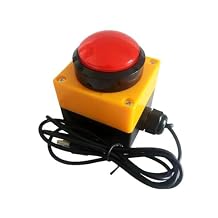
Major Policy Decision Button USB Macro Key Programmable Game Can Be Any Key on Keyboard PC Power Switch WOT Script Button Enter
Item #:
223382839
AUD 39
Price Details
Excluding Shipping & Custom charges ( Shipping and custom charges will be calculated on checkout )
*All items will import from US
0 ratings
Write a review
In stock
 Imported from USA store
QTY:
This product is not Fulfilled by Ubuy and can take minimum 10 days in delivery. We might cancel the product from the order and refund you if any issue arise with the delivery of this product.
Secured transaction
Ubuy works hard to protect your security and privacy. Our advanced payment security system ensures confidentiality by encrypting your information during transmission using AES (Advanced Encryption Standards) and SSL (Secure Socket Layer) protocols. Your payment details are 100% secure as we do not share your payment details with third party sellers.
Our Top Logistics Partners


After a hard day's work on the blue world, there is nothing more satisfying than unleashing nuclear Armageddon to let off some steam.

Fast
Shipping

Free
Return*

Secure Packaging

100% Original Products

PCI DSS Compliance

ISO 27001 Certified


Note: Step Down Voltage Transformer required for using electronics products of US store (110-120). Recommended power converters Buy Now.


Product Details
| Item Weight | 0.5 lbs (230 grams) |
Product Description
Major Policy Decision Button USB Macro Key Programmable Game Can Be Any Key on Keyboard PC Power Switch WOT Script Button Enter
Have any Query? Chat with us
Customer Questions & Answers
-
Question:
What is the Major Policy Decision Button used for?
Answer: The Major Policy Decision Button allows users to program specific keys to execute complex commands with a single press. This can be particularly useful in gaming or productivity applications, where quick access to macros or frequently used functions is beneficial. For instance, in a strategy game, you could set a macro to perform multiple actions, such as building and unit management, all by pressing one button. -
Question:
Can I program this button to perform different functions in different games?
Answer: Yes, you can customize the Major Policy Decision Button for specific games or applications. It features programmable macro capabilities that let you assign different actions and sequences depending on your gaming or productivity needs. This means you can have one setup for a first-person shooter and another for role-playing games, making it a versatile tool in your gaming arsenal. -
Question:
Is the Major Policy Decision Button compatible with all PC operating systems?
Answer: The Major Policy Decision Button is designed to be compatible with most PC operating systems, including Windows and macOS. This broad compatibility ensures that you can easily integrate it into your existing setup without complications. Whether you're running gaming software or productivity applications, you should be able to use this device seamlessly across different platforms. -
Question:
How do I program the Major Policy Decision Button?
Answer: Programming the Major Policy Decision Button is straightforward. Simply connect the device to your computer via USB and use the accompanying software to create or customize macros. The software interface typically allows you to assign any keyboard function to the button, enabling you to tailor it to your specific gaming or productivity needs. This flexibility enhances user experience and efficiency. -
Question:
What types of games benefit most from using a macro button?
Answer: Games that require quick reflexes and multi-step commands can benefit greatly from using a macro button like the Major Policy Decision Button. For example, MMO and RTS games often involve repetitive actions, and programming those commands into one key can significantly enhance your gameplay. This can streamline your performance in high-stakes scenarios, allowing you to focus on strategy rather than button mashing. -
Question:
Can multiple buttons be used in conjunction with this macro button?
Answer: Absolutely! You can use the Major Policy Decision Button alongside your standard keyboard to create a comprehensive gaming setup. This allows you to manage different commands and macros across multiple keys, enhancing your control and flexibility during intense gaming sessions. By pairing it with other programmable keys, you can create a customized input layout that suits your unique play style. -
Question:
What should I ensure before using the Major Policy Decision Button?
Answer: Before using the Major Policy Decision Button, make sure that your computer has the necessary drivers installed and that you check the compatibility with your preferred software. Also, review the programming instructions to optimize its functionality. This preparation ensures you can take full advantage of the customizable features and implement effective macros for your gaming or productivity tasks. -
Question:
Is it possible to reset the Major Policy Decision Button to default settings?
Answer: Yes, you can reset the Major Policy Decision Button to its factory settings. Most programming software offers an option to revert to defaults, which clears all custom macros. This feature is useful if you wish to start fresh or if settings are causing conflicts. Always consult the user manual or software guide for specific steps to ensure a complete reset without losing important settings. -
Question:
How durable is the Major Policy Decision Button?
Answer: The Major Policy Decision Button is designed for durability, featuring robust construction suited for frequent use. Gamers and power users can expect it to withstand extensive use without compromising functionality. This durability means that it can remain a reliable part of your setup, even through intense gaming sessions or heavy workloads, providing consistent performance over time. -
Question:
Where can I buy the Major Policy Decision Button?
Answer: You can purchase the Major Policy Decision Button from Ubuy in Kiribati. Ubuy offers a convenient shopping experience along with a wide selection of electronic gadgets. This platform is known for its dependable service and user-friendly interface, making it straightforward for customers to find and buy the Major Policy Decision Button that fits their needs.
EDIY Keyboards Editorial Review
No editorial reviews found
Customer Reviews & Ratings
1 customers ratings
-
5 Star
100%
-
4 Star
0%
-
3 Star
0%
-
2 Star
0%
-
1 Star
0%
Review this product
Share your thoughts with other customers
Product Price History
Important information
- Limitations : For products shipped internationally, please note that any manufacturer warranty may not be valid; manufacturer service options may not be available; product manuals, instructions, and safety warnings may not be in destination country languages; the products (and accompanying materials) may not be designed in accordance with destination country standards, specifications, and labeling requirements; and the products may not conform to destination country voltage and other electrical standards (requiring use of an adapter or converter if appropriate). The recipient is responsible for assuring that the product can be lawfully imported to the destination country. When ordering from Ubuy or its affiliates, the recipient is the importer of record and must comply with all laws and regulations of the destination country.
- Not all the products listed on Ubuy are for sale, as Ubuy is a global search engine. Products are subject to export/trade regulations.
AUD 39
This product is not Fulfilled by Ubuy and can take minimum 10 days in delivery. We might cancel the product from the order and refund you if any issue arise with the delivery of this product.
This item is not restrict in my country.(Please click on above link if this item is not restrict in your country, So our team will review and allow.)
QTY:
Secured transaction
Ubuy works hard to protect your security and privacy. Our advanced payment security system ensures confidentiality by encrypting your information during transmission using AES (Advanced Encryption Standards) and SSL (Secure Socket Layer) protocols. Your payment details are 100% secure as we do not share your payment details with third party sellers.
Our Top Logistics Partners
Fastest cross-border delivery
Features & Benefits
- Durable button with a mechanical life of 500,000 uses.
- Impressive design that looks both impressive and imposing.
- Customizable to replace any keyboard or mouse buttons.
- Versatile for various uses: raffles, contests, audio/video editing, and gaming.
- Activates with a satisfying *thunk-click* for an enhanced experience.
- Can automate specific tasks based on user requests.