- Home Page /
- Electronics /
- Computer Accessories /
- Tablet Replacement Parts /
- Screens /
- for iPad 7 7th/8 8th Gen Screen Replacement D...
0 ratings




Item #:
46467695
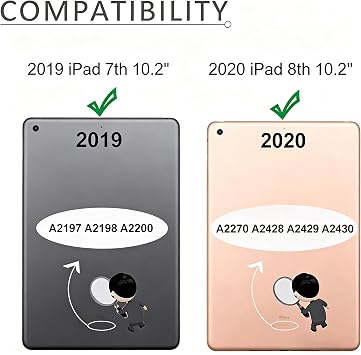
for iPad 7 7th/8 8th Gen Screen Replacement Digitizer 2019/2020 10.2" A2197 A2198 A2200 A2270 A2428 A2429 A2430 Without Button + Video Tips(Black)
88% of respondents would recommend this to a friend
Item #:
46467695
AUD 45
Price Details
Excluding Shipping & Custom charges ( Shipping and custom charges will be calculated on checkout )
*All items will import from US
In stock
 Imported from USA store
QTY:
Order now and get it around Friday, September 18
Secured transaction
Ubuy works hard to protect your security and privacy. Our advanced payment security system ensures confidentiality by encrypting your information during transmission using AES (Advanced Encryption Standards) and SSL (Secure Socket Layer) protocols. Your payment details are 100% secure as we do not share your payment details with third party sellers.
Our Top Logistics Partners


Brand New High Quality Digitizer Touch Screen Replacement for iPad 7th/8th Gen

Fast
Shipping

Free
Return*

Secure Packaging

100% Original Products

PCI DSS Compliance

ISO 27001 Certified



Note: Step Down Voltage Transformer required for using electronics products of US store (110-120). Recommended power converters Buy Now.


What Stands Out
High Compatibility
Designed specifically for iPad 7th/8th Gen models, ensuring a perfect fit and seamless integration without issues, catering directly to users needing precise replacements.
Included Video Guide
Comes with video tips to assist in the screen replacement process, making it easier for users to perform DIY repairs, minimizing the risk of installation errors.
Quality Materials
Crafted with durable components to enhance longevity and performance, providing users with a reliable solution that withstands everyday use while maintaining top-tier display clarity.
Product Details
| Product Dimensions (L x W x H) | 10.63 x 8.66 x 0.71 inches (27 x 22 x 1.8 cm) |
| Item Weight | 9.3 ounces (263.66 grams) |
| Manufacturer | TPhaelay |
| Item model number | FBA-TPIPCPDP-A2198-B |
| Date First Available | May 25, 2020 |
Who Should Buy?

-
DIY Enthusiasts
Ideal for individuals comfortable with technology who want to replace their own iPad screen effectively.
-
Budget Conscious Users
Perfect for users looking to save money on repairs by doing the replacement themselves instead of professional services.
-
Frequent Upgraders
Great for those who regularly upgrade devices and want to restore an old iPad for resale or personal use.

-
Inexperienced Users
Not suitable for those with little to no experience in electronics repair, as installation can be challenging.
Product Description
Have any Query? Chat with us
Customer Questions & Answers
-
Question:
What are the specifications of the iPad 7th and 8th Generation Screen Replacement Digitizer?
Answer: The iPad 7th and 8th Generation Screen Replacement Digitizer features a high-quality glass surface specifically designed for models A2197, A2198, A2200, A2270, A2428, A2429, and A2430. It ensures precise touch sensitivity and color accuracy, making it perfect for everyday use. The digitizer is compatible with standard tools and installation techniques, providing a seamless replacement experience. -
Question:
How do I know if I need a screen replacement for my iPad 7 or 8?
Answer: You may need a screen replacement if your iPad displays cracks, unresponsive areas, or touch input issues. Signs include visible damage, dead pixels, or difficulty navigating. If you notice your screen is consistently malfunctioning despite no visible damage, performing a self-test can help determine if the digitizer is faulty, requiring replacement. -
Question:
Is it easy to install the iPad 7 / 8 digitizer replacement?
Answer: Yes, installing the iPad 7 or 8 digitizer replacement can be a straightforward process for those with some technical skills. The kit typically includes all necessary components and tools. There are many online tutorials and videos available to guide you through the installation step-by-step, making it accessible for DIY enthusiasts. -
Question:
What should I do if my iPad screen isn't responding after replacement?
Answer: If your iPad screen isn't responding post-replacement, first try restarting your device. If that doesn't work, double-check your connections and ensure that the digitizer is properly seated in the connector. In some cases, updating your iPad's software might resolve compatibility issues. If problems persist, the replacement may need to be re-evaluated for defects. -
Question:
Are there warranties on the iPad 7 / 8 digitizer replacement?
Answer: Most reputable suppliers offer a warranty on their iPad digitizer replacements, typically ranging from 30 days to a year. This warranty covers defects in materials or workmanship. Always check the warranty details before purchasing to ensure that you are protected against manufacturing issues, providing peace of mind with your investment. -
Question:
What tools will I need for replacing the iPad 7th / 8th Generation screen?
Answer: Generally, you will need a set of precision screwdrivers, a suction cup, plastic opening tools, and tweezers. Some kits include everything necessary for the screen replacement, making it more straightforward for you. Having the right tools not only expedites the process but also reduces the risk of damaging other components during installation. -
Question:
Can I use my iPad normally while waiting for parts?
Answer: Yes, you can still use your iPad if the screen is cracked, but be cautious as the glass shards may pose injury risks or worsen the damage. For critical tasks, it may be best to avoid heavy usage until the screen replacement is completed. Protecting your device with a case can help mitigate additional damage while waiting for repairs. -
Question:
Does the replacement digitizer affect the display quality?
Answer: A high-quality replacement digitizer should not affect your display quality if installed correctly. Many after-market digitizers are designed to match the original specifications, ensuring clarity and touch responsiveness. Stick to reputable suppliers for your replacements to guarantee you receive a product that maintains the visual integrity of your iPad's display. -
Question:
Where can I buy iPad 7 / 8 digitizer replacements?
Answer: You can conveniently purchase the iPad 7th and 8th Generation screen replacement digitizer from Ubuy, an online platform that offers a variety of products. Ubuy provides detailed product descriptions and customer reviews to help you make an informed decision. With various shipping options, it's easy to get your replacement part directly delivered to your doorstep. -
Question:
What color options are available for the iPad digitizer replacement?
Answer: The iPad 7th and 8th Generation digitizer replacements are typically available in black and white to match your device's bezel. Ensuring you select the correct color is essential for maintaining the aesthetic appeal of your iPad. Choosing a color that matches your device enhances the overall look and ensures cohesive design.
TPhaelay Screens FBA-TPIPCPDP-A2198-B Editorial Review

The for iPad 7 7th8 8th Gen Screen Replacement Digitizer is a product that promises to fix a broken touchscreen on an iPad. However, the customer reviews for this product are mixed. Some users reported that the product worked as intended, and the replacement process was easy to complete. However, other users had issues with the product, including non-functioning touch screens, cracked screens, and adhesive that didn't stick. There were also reports of the home screen button not working with the replacement screen, resulting in further damage to the screen during attempted repairs. Overall, while some users had success with this product, there are too many negative reviews to recommend it overall. If you're looking to replace your iPad's screen, it may be best to Consider other options or to seek assistance from a professional.
Customer Reviews & Ratings
251 customers ratings
-
5 Star
65%
-
4 Star
13%
-
3 Star
9%
-
2 Star
2%
-
1 Star
11%
Review this product
Share your thoughts with other customers
Pros
- Easy to replace for those with experience
- Affordable option for fixing a broken iPad screen
- Comes with necessary tools
Cons
- Reports of non-functioning touch screens
Platform Trust & Buyer Confidence

JG
Jazz
Verified buyer
“Easy to use and always helpful and sorts any issues I've had past and present”
1 September 2026 · via Trustpilot
EK
Emmanuel
Verified buyer
“I always receive support when I engage customer service. Overall my experience with UBUY has been top notch. Keep up the good work.”
31 August 2026 · via Trustpilot
F
fnd
Verified buyer
“The delivery was fast and the product came undamaged and authentic.”
29 August 2026 · via Trustpilot
LC
Leana
Verified buyer
“Ubuy is extremely efficient and to order online is an easy process. The verity of products to buy is really unlimited! My order was urgent and I got it on time. The products are great! Thank you Ubuy!”
25 August 2026 · via Trustpilot
HL
Hengo
Verified buyer
“Fast, convenient and cheap. Great store!”
27 August 2026 · via Trustpilot
Secure Checkout
Global Delivery
Easy Returns
Genuine Products
Product Price History
Important information
- Limitations : For products shipped internationally, please note that any manufacturer warranty may not be valid; manufacturer service options may not be available; product manuals, instructions, and safety warnings may not be in destination country languages; the products (and accompanying materials) may not be designed in accordance with destination country standards, specifications, and labeling requirements; and the products may not conform to destination country voltage and other electrical standards (requiring use of an adapter or converter if appropriate). The recipient is responsible for assuring that the product can be lawfully imported to the destination country. When ordering from Ubuy or its affiliates, the recipient is the importer of record and must comply with all laws and regulations of the destination country.
- Not all the products listed on Ubuy are for sale, as Ubuy is a global search engine. Products are subject to export/trade regulations.
AUD 45
Order now and get it around Friday, September 18
This item is not restrict in my country.(Please click on above link if this item is not restrict in your country, So our team will review and allow.)
QTY:
Secured transaction
PCI DSS compliant and ISO 27001:2022 certified, with encrypted payments and full buyer protection on every order.
Our Top Logistics Partners
Fastest cross-border delivery
Features & Benefits
- Compatible with A2197, A2198, A2200, A2270, A2428, A2429, A2430
- Tested for quality assurance prior to shipping
- Does not include home button
- Repair instructions available on Youtube
- Retains Touch ID capabilities with original button
- Easy to install
Ubuy Assurance
Experience worry-free shopping with 100% original products, PCI DSS-compliant payment security, ISO 27001-certified data protection, the fastest cross-border delivery, free returns *, and secure packaging on every order.