- Home Page /
- Electronics /
- Computer Accessories /
- Computer Accessories & Peripherals /
- Audio & Video Accessories /
- Webcams & VoIP Equipment /
- Webcams /
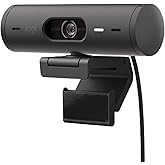
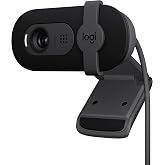
- Logitech 4k Webcam
0 ratings




Item #:
3262598
Logitech 4k Webcam
85% of respondents would recommend this to a friend
Item #:
3262598
AUD 260
Price Details
Excluding Shipping & Custom charges ( Shipping and custom charges will be calculated on checkout )
*All items will import from US
In stock
 Imported from USA store
QTY:
Only 20 items left in stock.
Order now and get it around Friday, October 09
Secured transaction
Ubuy works hard to protect your security and privacy. Our advanced payment security system ensures confidentiality by encrypting your information during transmission using AES (Advanced Encryption Standards) and SSL (Secure Socket Layer) protocols. Your payment details are 100% secure as we do not share your payment details with third party sellers.
Our Top Logistics Partners


Enhanced video collaboration with outstanding 4K resolution, auto-adjusting lighting technology, and clear audio capture.

Fast
Shipping

Free
Return*

Secure Packaging

100% Original Products

PCI DSS Compliance

ISO 27001 Certified



Note: Step Down Voltage Transformer required for using electronics products of US store (110-120). Recommended power converters Buy Now.


What Stands Out
4K Ultra HD
Experience unparalleled video clarity with 4K Ultra HD resolution, perfect for streaming, conferencing, and content creation, ensuring every detail shines through.
Automatic Light Correction
Enhance your visuals in any lighting with advanced automatic light correction, adapting seamlessly to varying environments for professional-grade video quality.
Versatile Compatibility
Easily integrates with multiple platforms including Zoom, Skype, and OBS, making it an ideal choice for professionals and gamers seeking flexible video solutions without installation hassles.
Product Details
- High-quality glass lens, 4K image sensor, HDR and auto focus for true-to-life videos
- RightLightTM 3 adjusts exposure and contrast for ideal lighting in any environment
- Supports USB 2.0 Type A, USB 3.0 Type A and C ports for versatile connectivity
- Works with Windows Hello, offering fast and secure face detection for Windows 10
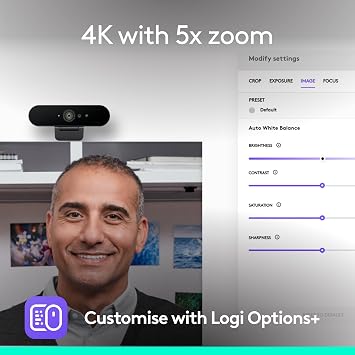
- HD 5x zoom, digital zooming, panning and choice of three fields of view while maintaining HD resolution
- Certified for Skype for Business and Cisco, compatible with popular video meeting apps like Zoom, WebEx, BlueJeans
| Sensor Type | Other |
| Connectivity Technology | USB |
| Color | Black |
| Special Feature | Infrared |
| Water Resistance Level | Not Water Resistant |
| Image stabilization | Digital |
| Form Factor | Laptop |
| Wireless Compability | Radio Frequency |
| Style Name | Old: 2017 Version |
| Item Dimensions D x W x H | 1"D x 1"W x 4"H (2.5 x 2.5 x 10.2 cm) |
| Number of Batteries | 1 Lithium Ion batteries required. |
| Operating System | Proprietary firmware or embedded operating system |
| Maximum Focal Length | 1 |
| Maximum Aperture | 2 f_stop |
| Minimum Focal Length | 1 |
| Lens Type | Zoom |
| Minimum Aperture | 1 millimeters |
| Focus Type | Auto Focus |
| Screen Size | 2.7 inches |
| Viewing Angle | 86.6 degrees |
| Display Resolution Maximum | UHD |
| Flash Memory Type | SD |
| Flash Memory Video Speed Class | V30 |
| Supported Audio Format | MP3, PCM |
| Compatible Devices | Personal Computer, Laptop, Tablet |
| Upper Temperature Rating | 113 °F |
| Brand | Logitech |
| Model Number | 960-001105 |
| Camcorder Type | Webcam |
| Model Name | Logitech BRIO |
| Built-In Media | webcam |
| Antenna Location | video conferencing, streaming, video recording |
| Unit Count | 1 Count |
| Manufacturer | Logitech |
| UPC | 097855125620 097855135643 097855088024 |
| Global Trade Identification Number | 00097855088024, 00097855125620, 10097855125627 |
| Item Type Name | Logitech Brio 4K Ultra HD Webcam - 960-001105 |
| Video Resolution | 4K |
| Video Capture Format | MP4 |
| Effective Still Resolution | 2160 pixels |
| Image Capture Speed | 30 frames_per_second |
| Shooting Modes | Automatic |
| Image Aspect Ratio | 16:9 |
| Supported Image Format | JPEG, PNG |
| White Balance Settings | Auto |
| File Format | MP4 |
| Exposure Control Type | Automatic |
| Effective Video Resolution | 2160 pixels |
| Optical Zoom | 100 x |
| Digital Zoom | 5 x |
| Zoom | Digital |
| Photo Sensor Technology | Other |
| Video Capture Resolution | 4K |
| Package Weight | 1 Pound |
What's in the box
webcam
Who Should Buy?

-
Content Creators
Ideal for YouTubers and streamers requiring high-quality video for live broadcasts and recorded content.
-
Remote Professionals
Enhances video quality for virtual meetings, ensuring clear communication during remote work setups.
-
Gamers
Perfect for gaming streams, offering high-resolution video that captures every detail during gameplay.

-
Casual Users
May be overkill for those who only need basic video quality for occasional video calls.
Product Description
About This Item
Upgrade your video conferencing, recording, and streaming experience with the Logitech Brio Ultra HD Webcam. Designed for professionals who value crystal-clear video quality, this webcam offers stunning 4K resolution that captures every detail with precision. With Logitech Brio, you can now make a lasting impression during video conferences. Whether you are presenting a slideshow or collaborating with remote team members, this webcam ensures you are seen in the best light.
The Ultra HD resolution coupled with HDR (High Dynamic Range) technology delivers vibrant and lifelike colors, allowing you to convey your ideas with more clarity. Not only does the Logitech Brio excel in video quality, but it also boasts an advanced lens technology. The RightLight 3 with HDR adjusts lighting conditions, ensuring accurate colors even in challenging environments. Say goodbye to dimly lit spaces or harsh overhead lights that make you look washed out.
With the Logitech Brio, you'll always look your best. Thanks to its wide-angle lens, you can fit more people or larger objects in the frame without distortion. This is particularly useful for group conferences or live streaming events. Plus, the 5x digital zoom lets you focus on the most important details, giving you complete control over your visuals. The Logitech Brio is also equipped with a reliable and secure facial recognition feature.
The infrared sensor with Windows Hello compatibility ensures fast and secure logins, so you can protect your data without the hassle of typing passwords. Setting up the Logitech Brio is a breeze. It connects easily to your computer via USB, and the adjustable clip allows for flexible mounting options. Whether you have a laptop, desktop, or external monitor, you can position the webcam at the perfect angle for your needs. In conclusion, the Logitech Brio Ultra HD Webcam is a versatile and powerful tool for video conferencing, recording, and streaming.
Its exceptional video quality, advanced lens technology, and user-friendly features make it the perfect choice for professionals who want to make a lasting impression. Upgrade your video experience with the Logitech Brio today and see the difference for yourself.
Have any Query? Chat with us
Customer Questions & Answers
-
Question:
What are the key features of the Logitech Brio 4K Webcam?
Answer: The Logitech Brio 4K Webcam boasts impressive features such as Ultra HD 4K resolution at 30 frames per second, HDR support, and a 90-degree field of view. Additionally, it has advanced autofocus capabilities and background removal, which makes it ideal for professional streaming, video conferencing, and online education. These features ensure that your video quality is sharp and clear, making a significant difference during remote meetings or when creating high-quality content for platforms like YouTube and Twitch. -
Question:
Is the Logitech Brio 4K Webcam compatible with my computer?
Answer: Yes, the Logitech Brio 4K Webcam is compatible with various operating systems, including Windows, macOS, and Chrome OS. It supports USB 3.0 for seamless connectivity. The webcam can be used across diverse software like Zoom, Skype, and OBS Studio, allowing for versatile application in video calls, live streams, and recordings. To ensure optimal performance, check that your system meets the minimum requirements for 4K video processing. -
Question:
How do I install the Logitech Brio 4K Webcam?
Answer: Installing the Logitech Brio 4K Webcam is a straightforward process. Simply connect the webcam to your computer’s USB port, and it should automatically be recognized. For optimal performance, download the Logitech Capture software, which offers advanced options to customize settings like zoom, exposure, and more. This installation process makes it suitable for users of all skill levels, whether you're a tech-savvy content creator or a remote worker needing a reliable webcam. -
Question:
Can I use the Logitech Brio 4K Webcam for streaming?
Answer: Absolutely! The Logitech Brio 4K Webcam is highly recommended for streaming due to its exceptional video quality and features like low-light correction. It integrates seamlessly with popular streaming platforms, giving you the edge in delivering professional-grade live streams or content. Whether you're gaming, hosting webinars, or conducting interviews, the webcam's 4K resolution and HDR capabilities will enhance the viewing experience for your audience. -
Question:
What kind of microphone does the Logitech Brio 4K Webcam have?
Answer: The Logitech Brio 4K Webcam features dual omnidirectional microphones that capture clear audio. These microphones work well to filter out background noise, focusing on your voice, which is particularly useful during video calls or recordings. The enhanced sound quality combined with the high-resolution video ensures that your communication is professional and effective, whether you're participating in business meetings or casual catch-ups. -
Question:
Does the Logitech Brio 4K Webcam require additional software?
Answer: While the Logitech Brio 4K Webcam can work without additional software, using Logitech's proprietary software, such as Logitech Capture, can significantly enhance your experience. This software allows you to customize settings like light adjustments, camera angles, and transitions. It is particularly beneficial for content creators looking to produce polished videos or streamers wanting to manage multiple sources efficiently. -
Question:
What are the privacy features of the Logitech Brio 4K Webcam?
Answer: The Logitech Brio 4K Webcam includes a Privacy Shutter, which allows you to cover the lens when not in use. This feature helps to protect your privacy and provides peace of mind when the camera is not actively being used. Additionally, it complies with various security standards, making it a reliable choice for those who prioritize online privacy and security during video calls or recordings. -
Question:
How do I adjust the settings on the Logitech Brio 4K Webcam?
Answer: Adjusting the settings on the Logitech Brio 4K Webcam can be done through the Logitech Capture software, which lets you modify various parameters like brightness, contrast, and saturation. You can also set different preset views for specific scenarios, such as group calls or presentations. By fine-tuning these settings, you can achieve optimal image quality tailored to your environment and personal preferences. -
Question:
Can I mount the Logitech Brio 4K Webcam on a tripod?
Answer: Yes, the Logitech Brio 4K Webcam is designed with a standard tripod thread at its base, allowing you to securely mount it on a tripod or any compatible mounting accessory. This feature provides flexibility in positioning the webcam, helping you achieve the best angle for your video recordings or streaming sessions. It's especially advantageous for content creators who need to adjust their camera setup repeatedly. -
Question:
Where can I buy the Logitech Brio 4K Webcam in Kiribati?
Answer: You can purchase the Logitech Brio 4K Webcam from Ubuy in Kiribati. Ubuy offers a wide selection of electronics, ensuring you have access to authentic products and reliable service. This makes Ubuy a great option for customers looking to buy high-quality tech like the Logitech Brio.
Logitech Webcams 960-001105 Editorial Review


Logitech 4k Webcam delivers exceptional video quality with an impressive 60fps at 720p and stunning 4K resolution. Its user-friendly installation process and responsive software, reminiscent of Logitech's newer products like the Triathlon Mouse, enhance the experience. Reviews highlight the camera's brilliant clarity and ease of use, although setup for Windows Hello requires a quick firmware update. Users appreciate the solid autofocus and decent microphone quality, making it ideal for professional settings, video conferencing, and streaming. Many agree this camera finally fulfills the long-awaited desire for a truly reliable webcam, establishing a new standard for quality in video calls.
Customer Reviews & Ratings
17693 customers ratings
-
5 Star
78%
-
4 Star
13%
-
3 Star
4%
-
2 Star
2%
-
1 Star
3%
Review this product
Share your thoughts with other customers
Pros
- Captivating 4K video quality
- User-friendly setup and operation
- Solid autofocus for clear images
- Great performance in various lighting
- Decent built-in microphone
Cons
- Stand design could be improved for better stability
Platform Trust & Buyer Confidence

JK
Jasmin
Verified buyer
“Great products and very good service: very easy and very fast international delivery.”
9 September 2026 · via Trustpilot
AG
Anke
Verified buyer
“Wonderful online shopping experience, smooth transaction from the start. Payment method works conveniently and delivery is unexpectedly fast and reliable. You go the extra mile for service. What makes this even more amazing, you deliver to Namibia. I will remain a happy Ubuy customer and will increase my purchases for sure! Thank you!”
10 September 2026 · via Trustpilot
H
Hazel
Verified buyer
“Very easy to find the products what you need, and so fast delivery, that’s why I highly recommended to others costumers to used ubuy.”
10 September 2026 · via Trustpilot
O
Opaleye
Verified buyer
“I received exactly what I ordered I was skeptical about your site because that was my first time to order. But the order came timely and neatly packaged. I was not disappointed. Thank you.”
11 September 2026 · via Trustpilot
AC
Adele
Verified buyer
“Easy to find and order what you want on the website. Delivery is quick to the UK”
8 September 2026 · via Trustpilot
Secure Checkout
Global Delivery
Easy Returns
Genuine Products
Customers also viewed these products

Product Price History
Important information
- Limitations : For products shipped internationally, please note that any manufacturer warranty may not be valid; manufacturer service options may not be available; product manuals, instructions, and safety warnings may not be in destination country languages; the products (and accompanying materials) may not be designed in accordance with destination country standards, specifications, and labeling requirements; and the products may not conform to destination country voltage and other electrical standards (requiring use of an adapter or converter if appropriate). The recipient is responsible for assuring that the product can be lawfully imported to the destination country. When ordering from Ubuy or its affiliates, the recipient is the importer of record and must comply with all laws and regulations of the destination country.
- Not all the products listed on Ubuy are for sale, as Ubuy is a global search engine. Products are subject to export/trade regulations.
AUD 260
Order now and get it around Friday, October 09
This item is not restrict in my country.(Please click on above link if this item is not restrict in your country, So our team will review and allow.)
QTY:
Only 20 items left in stock.
Secured transaction
PCI DSS compliant and ISO 27001:2022 certified, with encrypted payments and full buyer protection on every order.
Our Top Logistics Partners
Fastest cross-border delivery
Features & Benefits
- 4K HD resolution for outstanding video quality
- Auto-adjusting lighting technology for a flattering look in any environment
- Integrated dual mics with noise-canceling technology for clear audio capture
- Free Logi Tune desktop app for webcam control and customization
- Access to multiple diagonal-field-of-view presets for perfectly framed video
- Ideal for personal workspaces at home or in the office
Ubuy Assurance
Experience worry-free shopping with 100% original products, PCI DSS-compliant payment security, ISO 27001-certified data protection, the fastest cross-border delivery, free returns *, and secure packaging on every order.