0 ratings

Item #:
1586187
Edge USB
Item #:
1586187
AUD 2209277
Price Details
Excluding Shipping & Custom charges ( Shipping and custom charges will be calculated on checkout )
*All items will import from US
0 ratings
Write a review
Out of stock
 Imported from USA store
Secured transaction
Ubuy works hard to protect your security and privacy. Our advanced payment security system ensures confidentiality by encrypting your information during transmission using AES (Advanced Encryption Standards) and SSL (Secure Socket Layer) protocols. Your payment details are 100% secure as we do not share your payment details with third party sellers.
Our Top Logistics Partners


Engage, connect and collaborate in the most effective way. Share your notes and work remotely with anyone.

Fast
Shipping

Free
Return*

Secure Packaging

100% Original Products

PCI DSS Compliance

ISO 27001 Certified


Note: Step Down Voltage Transformer required for using electronics products of US store (110-120). Recommended power converters Buy Now.


What Stands Out
Versatile Connectivity
The Edge + USB offers seamless connectivity options, allowing users to easily sync and transfer data, enhancing productivity across multiple devices without any hassle.
Compact Design
Its sleek and compact design ensures portability, making it ideal for on-the-go professionals who need to carry essential tools without unnecessary bulk.
High-Speed Performance
Designed with advanced technology, the Edge + USB provides high-speed data transfer, significantly reducing wait times and improving overall efficiency for users with demanding tasks.
Product Details
| Item Weight | 0.1 lbs (50 grams) |
Who Should Buy?

-
Tech-savvy Users
Ideal for users who frequently upgrade their devices and require versatile connectivity options for data transfer.
-
Frequent Travelers
Perfect for travelers needing a compact solution to manage multiple devices and data on the go.
-
Remote Workers
Useful for remote workers who need reliable connectivity for devices on a home or office network.

-
Casual Users
Not suitable for casual users who require basic plug-and-play features without advanced connectivity.
-
Budget-conscious Buyers
May not appeal to budget-conscious buyers looking for a more cost-effective solution without added features.
-
Non-tech Enthusiasts
Not ideal for those uncomfortable with technology, as it may require some understanding of connectivity protocols.
Product Description
Edge USB
Have any Query? Chat with us
Customer Questions & Answers
-
Question:
What is Edge USB and how does it work?
Answer: Edge USB refers to advanced USB drives designed for high-speed data transfer and storage. These drives utilize cutting-edge technology, often boasting faster read and write speeds than standard USBs. They work by connecting to any compatible USB port, allowing users to transfer files, back up data, or extend storage capacity with ease. Ideal for professionals who require quick access to large files, Edge USB drives ensure efficient workflows and seamless data management. -
Question:
What are the storage capacities available for Edge USB?
Answer: Edge USB drives are available in a variety of storage capacities to suit different needs. Common options include 16GB, 32GB, 64GB, and even larger capacities up to 1TB or more. These choices cater to casual users who need basic file storage, as well as professionals or gamers who require extensive space for larger files, applications, or multimedia. Selecting the right capacity depends on your data storage habits and file sizes you frequently handle. -
Question:
What devices are compatible with Edge USB drives?
Answer: Edge USB drives are designed to be universally compatible with a wide range of devices. You can easily connect them to computers, laptops, game consoles, and certain tablets or smartphones that support USB OTG. This versatility enables users to transfer files across different platforms effortlessly. For example, you might use an Edge USB drive to transfer media files from a computer to a gaming console or back up important documents on the go. -
Question:
Can Edge USB drives store multimedia files?
Answer: Yes, Edge USB drives are excellent for storing multimedia files such as music, videos, and photos. Their higher storage capacities combined with fast read/write speeds make them suitable for transferring large files efficiently. For instance, a photographer can use an Edge USB drive to store and transfer high-resolution images from a camera to a computer for editing, or a music producer can back up their sound library without delay. -
Question:
What are the advantages of using Edge USB drives over traditional USBs?
Answer: Edge USB drives often provide superior speed and durability compared to traditional USB drives. Many models are designed to withstand harsher conditions, offering features like water resistance and shockproof casing. Additionally, their advanced technology allows faster data transfer speeds, significantly reducing the time needed for backups or file transfers. For professionals and tech enthusiasts, these advanced features enhance productivity and reliability. -
Question:
What types of data transfer speeds can I expect from Edge USB drives?
Answer: Edge USB drives typically support high data transfer speeds, often ranging from 100 MB/s to 500 MB/s, depending on the model and USB standard (USB 3.0, 3.1, or 3.2). This high-speed performance is particularly beneficial for users who frequently move large files, such as 4K videos or extensive databases. For example, a graphic designer can quickly transfer project files to and from an Edge USB drive, allowing more time for creativity without frustration. -
Question:
Are there security features available in Edge USB drives?
Answer: Many Edge USB drives come with built-in security features, such as encryption and password protection, to keep your data safe from unauthorized access. These features are essential for professionals handling sensitive information or personal users concerned about privacy. For instance, a business professional can store client data on an Edge USB drive, using password protection to ensure that only authorized individuals can access it. -
Question:
How can I format my Edge USB drive for different uses?
Answer: To format an Edge USB drive for different uses, you can connect it to your computer and use the built-in formatting tool in your operating system. By selecting the desired file system (NTFS, FAT32, exFAT), you can tailor the drive for specific tasks, like storing large files or ensuring compatibility with various devices. For example, formatting the drive to exFAT allows seamless file transfers between Windows and Mac systems. -
Question:
Can I use Edge USB drives for gaming?
Answer: Absolutely! Edge USB drives are great for gaming purposes, as they can be used to store game files, downloadable content, and backups. Their fast data transfer speeds and larger capacities mean games can load faster, reducing wait times. Gamers can also use Edge USB drives to back up game saves or transfer games between consoles, making them a practical accessory for enhancing the gaming experience. -
Question:
Where can I buy Edge USB in Kiribati?
Answer: You can buy Edge USB from Ubuy, which offers a wide selection of electronic products, including high-quality Edge USB drives. Ubuy provides a convenient platform for browsing, comparing models, and selecting the right USB drive that fits your requirements, making it an excellent choice for your digital storage needs.
eBeam Presentation Products Editorial Review
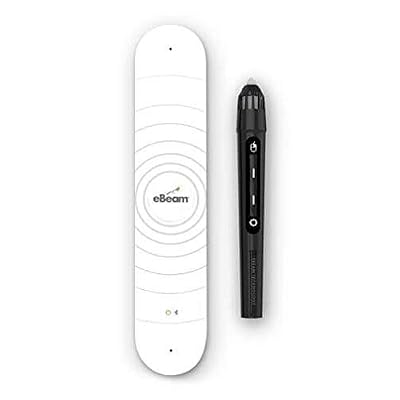
The eBeam Edge + USB allows users to turn any surface into an interactive whiteboard. It requires a projector to display the digital information and a computer to control it. The eBeam Edge + USB works with both Windows and Mac operating systems. Despite not being wireless, users can order a wireless version directly from the eBeam website. Customers have asked if this device works without a projector or with an iPad or iPhone, to which the answer is no. The device requires a projector and computer to function properly. However, the manufacturer has provided software for the Mac operating system that can be found on their website. The eBeam Edge + USB is a great product for teachers, business professionals, or anyone who needs to make a presentation. It's a cost-effective solution for turning any surface into a whiteboard.
Customer Reviews & Ratings
1 customers ratings
-
5 Star
100%
-
4 Star
0%
-
3 Star
0%
-
2 Star
0%
-
1 Star
0%
Review this product
Share your thoughts with other customers
Pros
- Cost-effective
- Works with both Windows and Mac operating systems
- Can be used with any surface
- Great for presentations
Cons
- Not wireless
Product Price History
Important information
- Limitations : For products shipped internationally, please note that any manufacturer warranty may not be valid; manufacturer service options may not be available; product manuals, instructions, and safety warnings may not be in destination country languages; the products (and accompanying materials) may not be designed in accordance with destination country standards, specifications, and labeling requirements; and the products may not conform to destination country voltage and other electrical standards (requiring use of an adapter or converter if appropriate). The recipient is responsible for assuring that the product can be lawfully imported to the destination country. When ordering from Ubuy or its affiliates, the recipient is the importer of record and must comply with all laws and regulations of the destination country.
- Not all the products listed on Ubuy are for sale, as Ubuy is a global search engine. Products are subject to export/trade regulations.
AUD 2209277
Currently unavailable.
We don't know when or if this item will be back in stock.
This item is not restrict in my country.(Please click on above link if this item is not restrict in your country, So our team will review and allow.)
Secured transaction
Ubuy works hard to protect your security and privacy. Our advanced payment security system ensures confidentiality by encrypting your information during transmission using AES (Advanced Encryption Standards) and SSL (Secure Socket Layer) protocols. Your payment details are 100% secure as we do not share your payment details with third party sellers.
Our Top Logistics Partners
Fastest cross-border delivery
Features & Benefits
- Annotate, interact and build content with easy to use tools
- Distribute materials anytime, anywhere
- Utilize existing surfaces to save and distribute materials
- Highly portable and easy to use