0 ratings
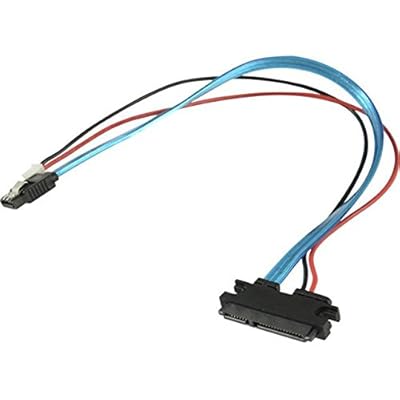
SATA cable HDD Cable hard disk cable. Connect 2.5 inch hard disk to Banana Pi

SATA cable HDD Cable hard disk cable. Connect 2.5 inch hard disk to Banana Pi

0 ratings Write a review
Out of stock
us Imported from USA store
Our Top Logistics Partners
  • fedex
  • dhl
U-Care Warranty:
None
Select a Plan
fast shipping

Fast
Shipping

free return

Free
Return*

secure packaging

Secure Packaging

100% original products

100% Original Products

pci-dss

PCI DSS Compliance

iso certified

ISO 27001 Certified


paypal payment
visa payment
mastercard payment
Note: Step Down Voltage Transformer required for using electronics products of US store (110-120). Recommended power converters Buy Now.

What Stands Out

Compact Design
The SATA cable's slim profile ensures easy handling and minimal space usage, ideal for compact setups or when connecting a 2.5-inch hard disk to your Banana Pi.
High-Speed Data Transfer
Engineered for fast data transfer rates, this SATA cable minimizes lag during file transfers, ensuring seamless operation and efficiency with your hard disk.
Durable Material
Constructed with robust materials, the cable resists wear and tear, ensuring longevity and reliable performance for your 2.5-inch hard disk connection, providing excellent value.

Product Details

Shop SATA cable HDD Cable hard disk cable. Connect 2.5 inch hard disk to Banana Pi online at a best price in Kiribati. B00YNIHK9Y
Is Discontinued By Manufacturer No
Package Dimensions 2 x 2 x 0.2 inches (5.1 x 5.1 x 0.5 cm); 3.53 ounces (100.08 grams)
Date First Available March 17, 2018
Manufacturer Balance world

Who Should Buy?

Suitable For
  • DIY Enthusiasts

    Ideal for individuals passionate about building custom electronics projects using Banana Pi and 2.5-inch hard drives.

  • Data Recovery

    Useful for professionals or hobbyists trying to recover data from 2.5-inch hard disks using a Banana Pi setup.

  • Compact Storage Solutions

    Great for those looking to create a compact, portable storage solution with a Raspberry Pi alternative.

Not Suitable For
  • Standard Desktop Users

    Not suitable for regular desktop users who do not utilize Banana Pi for their computing needs.

  • High-Speed Applications

    May not meet the speed requirements for users needing high-performance data transfers typical in gaming or video editing.

  • Non-Technical Users

    Not recommended for individuals unfamiliar with connecting hardware components or troubleshooting issues with Banana Pi.

Product Description

SATA cable HDD Cable hard disk cable. Connect 2.5 inch hard disk to Banana Pi

Have any Query? Chat with us

Customer Questions & Answers

  • Question: What is a SATA HDD cable used for?

    Answer: A SATA HDD cable is designed to connect your hard disk drive (HDD) to the motherboard of your computer or server. This connection allows for the transfer of data between the hard disk and other components. The SATA interface is known for its high-speed data transfer capabilities and is compatible with both SSDs and HDDs. This makes it a crucial component in building or upgrading computer systems, or connecting external drives to a microcontroller, like the Banana Pi.
  • Question: Can I use a SATA cable to connect a 2.5 inch hard disk to a Banana Pi?

    Answer: Yes, you can use a SATA cable to connect a 2.5 inch hard disk to a Banana Pi, provided you have the necessary power and adapters. The SATA cable will secure the data connection, while you will also need appropriate power support for the hard disk. This setup allows you to expand your storage solutions for projects involving the Banana Pi, making it possible to run operating systems or store files more efficiently.
  • Question: What length of SATA cable should I choose?

    Answer: Choosing the right length of SATA cable is important for creating a neat and functional setup. Cables typically range from 18 inches to 3 feet or more. It's best to measure the distance between your hard disk and the motherboard or connector before purchasing. Opting for a slightly longer cable can provide flexibility in routing and connecting components, particularly if you're building a case with limited space. Ensure that it does not impede airflow or create clutter.
  • Question: Are all SATA cables the same?

    Answer: While SATA cables broadly serve the same purpose of connecting devices, there can be differences in data transfer speed capabilities, connectors, and build quality. Standard SATA III cables support up to 6 Gb/s data transfer, while SATA II supports up to 3 Gb/s. When choosing, consider the specifications of your devices to maximize performance. Additionally, reinforced cables may offer greater durability against bends and wear, which can be beneficial for portable setups.
  • Question: What is the difference between SATA and IDE cables?

    Answer: The primary difference between SATA and IDE cables lies in their technology and performance capabilities. SATA (Serial ATA) cables are thinner, easier to manage, and allow for faster data transfer rates than IDE (Integrated Drive Electronics) cables. IDE cables are bulkier and can support only two devices per cable, whereas SATA can connect multiple devices. For modern applications, SATA cables are preferred for connecting hard disks to microcontrollers like the Banana Pi.
  • Question: Do I need special tools to install a SATA HDD cable?

    Answer: No, you do not need any special tools to install a SATA HDD cable. Typically, the cable features a simple plug-and-play design, allowing you to connect it securely to both the hard disk drive and the motherboard without additional tools. However, ensure that you handle components with care to avoid damaging sensitive connectors, and follow any guidelines if you're mounting a hard disk in a specific enclosure or case.
  • Question: Can I connect more than one hard disk using SATA cables?

    Answer: Yes, you can connect multiple hard disks using SATA cables, as long as your motherboard has enough SATA ports available. This capability allows for creating RAID configurations or simply expanding storage capacity for projects. Ensure that your power supply can support the additional hard disks to prevent any issues during operation. Using multiple hard disks is a common practice in setups requiring greater storage capabilities, such as media servers and backup solutions.
  • Question: Is it safe to use a long SATA cable?

    Answer: Using a longer SATA cable is generally safe, but performance can vary based on the cable's quality and the length used. While standard cables can reach lengths up to about 3 feet without issue, longer cables might face signal degradation. For optimal performance, ensure you invest in high-quality, well-shielded cables if additional length is required. This will help maintain the connection quality, especially in data-intensive applications or setups.
  • Question: How do I determine if my hard disk is compatible with the SATA cable?

    Answer: To determine compatibility, check both your hard disk specifications and the SATA cable's version. Most modern hard disks will support SATA III, but also check the motherboard or device compatibility. This information can typically be found in the user manual or manufacturer's website. Ensuring the right connection type (SATA I, II, or III) is crucial for optimal performance when connecting your hard disk to a Banana Pi or any other system.
  • Question: Where can I buy a SATA cable HDD cable to connect a 2.5 inch hard disk to Banana Pi?

    Answer: You can purchase a SATA cable HDD cable suitable for connecting a 2.5 inch hard disk to Banana Pi through Ubuy in Kiribati. Ubuy offers a variety of options, allowing you to choose the right length and specifications to suit your project needs. They provide access to reliable brands and guarantee a secure shopping experience, making it easier to find the right components for your tech setup.

Balance world SATA Cables Editorial Review

No editorial reviews found

Customer Reviews & Ratings

5.0
1 customers ratings
  • 5 Star
    100%
  • 4 Star
    0%
  • 3 Star
    0%
  • 2 Star
    0%
  • 1 Star
    0%

Review this product

Share your thoughts with other customers

Pros

  • High data transfer speed
  • Durable and reliable connection
  • Easy to install
  • Compatible with multiple devices
  • Flexible and lightweight design

Cons

  • Connector might be a bit snug.

Product Price History

Important information

  • Limitations : For products shipped internationally, please note that any manufacturer warranty may not be valid; manufacturer service options may not be available; product manuals, instructions, and safety warnings may not be in destination country languages; the products (and accompanying materials) may not be designed in accordance with destination country standards, specifications, and labeling requirements; and the products may not conform to destination country voltage and other electrical standards (requiring use of an adapter or converter if appropriate). The recipient is responsible for assuring that the product can be lawfully imported to the destination country. When ordering from Ubuy or its affiliates, the recipient is the importer of record and must comply with all laws and regulations of the destination country.
  • Not all the products listed on Ubuy are for sale, as Ubuy is a global search engine. Products are subject to export/trade regulations.